



Many business leaders ask, “how can an employer maximize their work opportunity tax credits?” because valuable hiring incentives often disappear inside incomplete recruiting, on-boarding, payroll, and tax processes.
An eligible worker might miss screening, a submission might arrive late, or a certification might remain disconnected from payroll. Each breakdown reduces eligible credit capture.
A stronger process connects screening, documentation, filing, certification tracking, payroll coordination, and reporting. It gives every eligible hire the same structured path.
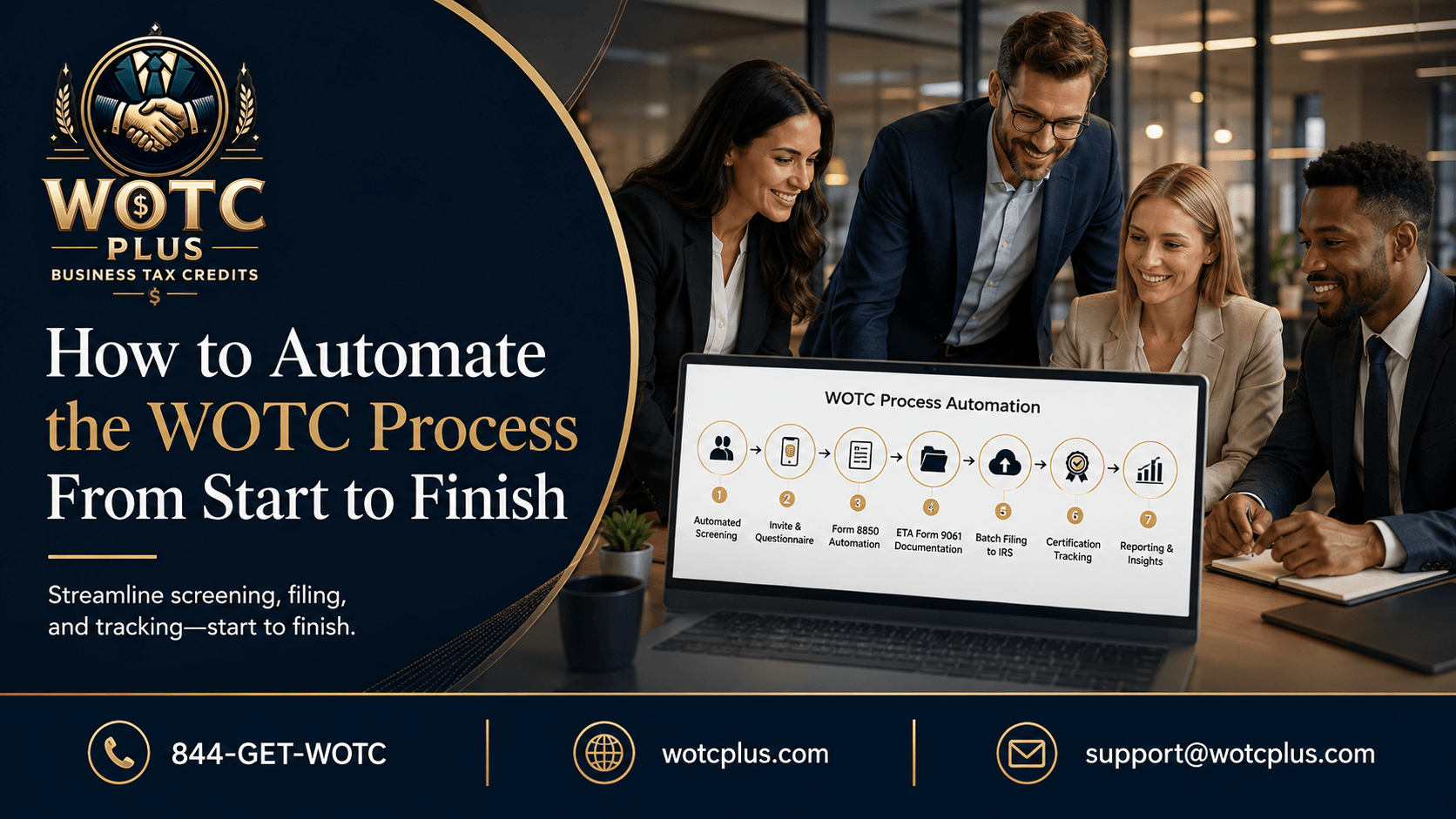
WOTC Plus works for employers through fully managed, end-to-end WOTC processing. The service covers automated WOTC screening, SMS-based questionnaire invitations, documentation handling, automated batch filing for applicable periods, certification tracking, payroll workflow coordination, and organized reporting.
Current WOTC Status
As of August 2026, WOTC does not apply to employees who began work after December 31, 2025. The IRS also states that Form 8850 is no longer in use for post-2025 hires.
Employers should not apply expired procedures to 2026 hires unless Congress renews the credit and agencies publish updated instructions. This guide covers eligible pre-2026 hires, pending certifications, prior-year claims, and renewal readiness.
Quick Summary
Employers maximize eligible WOTC value by screening every covered new hire at the proper stage, protecting the historical 28-day submission deadline, organizing complete documentation, tracking State Workforce Agency decisions, connecting certified employees with payroll wages and hours, and maintaining tax-ready records. WOTC Plus runs these stages as one managed workflow, replacing scattered forms, manual reminders, incomplete tracking, and disconnected reporting with a low-touch employer process.
What Is the Work Opportunity Tax Credit?
The Work Opportunity Tax Credit is a federal hiring tax credit connected to workers from designated groups that faced significant barriers to employment.
During the authorized period, targeted groups included qualified veterans, qualified ex-felons, certain SNAP and TANF recipients, vocational rehabilitation referrals, Supplemental Security Income recipients, designated community residents, qualified summer youth employees, qualified long-term unemployment recipients, and qualified long-term family assistance recipients.
An employer needed State Workforce Agency certification before claiming the credit. Taxable employers generally calculated it on Form 5884 and reported it through the general business credit process.
Credit value depended on the targeted group, qualified wages, hours worked, and statutory limits. Strong capture therefore required a complete employee-level record from pre-screening through tax reporting.
Why Employers Leave WOTC Value Unclaimed
WOTC administration crosses recruiting, HR, payroll, finance, tax, and operations.
Common breakdowns include:
- New hires never receiving a questionnaire
- Screening beginning after the offer stage
- Missing signatures, dates, or supporting details
- Late State Workforce Agency submissions
- Incorrect state routing
- Pending cases receiving no follow-up
- Certification notices stored outside the main system
- Payroll data remaining disconnected
- Reports lacking employee-level support
A full-service WOTC vendor creates one controlled workflow across these stages.
1. Screen Every Eligible New Hire
Complete screening coverage is the foundation of stronger WOTC capture.
Employers should not depend on recruiters to identify eligibility. Many qualifying circumstances are not visible, so selective screening creates inconsistent participation and overlooked opportunities.
A mobile-friendly questionnaire gives every covered applicant the same process. SMS invitations and automated reminders reduce incomplete screening.
For any future WOTC extension, screening should restart only after official guidance confirms eligible hiring dates, required forms, targeted groups, and submission procedures.
2. Protect Pre-Screening Timing
For eligible pre-2026 hires, the applicant and employer generally completed Form 8850 on or before the day the employment offer was made.
This requirement made timing essential. Sending the questionnaire after the employee started work did not recreate a timely pre-screening event.
Employers strengthen coverage by connecting screening with applicant tracking, offer, or onboarding systems. The workflow should capture all required dates.
WOTC Plus coordinates screening with internal employer workflow integration so timing does not depend on separate emails, paper packets, or recruiter memory.
3. Control the 28-Day Submission Requirement
For applicable pre-2026 hires, employers generally submitted Form 8850 to the State Workforce Agency no later than the 28th calendar day after the employee began work.
The form went to the agency where the employee worked, not to the IRS.
A deadline-focused workflow should calculate the due date from the start date, flag incomplete files, prioritize approaching deadlines, route submissions correctly, and retain proof of delivery.
Automated batch filing organizes high hiring volumes while exception queues separate incomplete or time-sensitive files.
4. Integrate WOTC Into Onboarding
WOTC performs more effectively when it sits inside hiring and onboarding rather than appearing as an extra tax form after orientation.
A structured workflow follows this sequence:
New hire reaches the approved stage → receives an SMS questionnaire → completes mobile-friendly screening → documentation is organized → required forms are prepared → applicable files are submitted → certifications are tracked → payroll wages and hours are matched → reports move to finance.
This sequence assigns clear ownership across recruiting, HR, payroll, WOTC operations, and finance.
5. Track Every Certification Status
Submission is not the finish line. An employer needed State Workforce Agency certification confirming that the employee belonged to an eligible targeted group before claiming the related credit.
Every file should carry a clear status:
- Submitted
- Pending
- Additional information requested
- Certified
- Denied
- Appealed
- Payroll ready
- Tax reported
A centralized ledger should connect employee, entity, worksite, dates, agency status, certification, hours, wages, tax year, and supporting documents.
Without certification tracking, approved files remain unused, agency requests go unanswered, and pending cases disappear between teams.
6. Connect Certifications With Payroll
Certification establishes targeted-group status, but credit value also depends on qualified wages and hours worked.
Under historical rules, an employee generally needed at least 120 hours of service before qualified wages produced a credit. The percentage increased after 400 hours. Wage ceilings differed across targeted groups, with certain veteran categories carrying higher limits.
A complete payroll integration should identify certified employees, measure qualifying hours, capture eligible wages, apply the correct group limit, and exclude wages affected by conflicting tax provisions where required.
The result is an employee-level record linking certification, hours, wages, calculation, and reporting.
7. Preserve Complete Documentation
A strong WOTC file should contain:
- Completed screening records
- Applicable Form 8850 records
- ETA Form 9061 or related documentation
- State submission confirmation
- Agency correspondence
- Certification or denial notice
- Employee start-date records
- Payroll wage and hour details
- Credit calculation workpapers
- Tax reporting references
Records should remain connected by employee, entity, location, and tax year.
Organized WOTC reporting creates that connection and reduces year-end reconstruction.
8. Measure the WOTC Funnel
Employers often focus only on the final credit amount. A better operating view measures every stage.
Useful metrics include screening invitation rate, questionnaire completion rate, timely submission rate, certification approval rate, pending certification count, payroll match rate, tax-ready credit value, and credit value by location.
These metrics expose whether value is lost through invitation, completion, filing, certification, payroll, or reporting gaps.
9. Prepare for High-Volume Hiring
High-volume hiring adds pressure across locations, systems, and state agencies.
A scalable WOTC process should standardize questionnaire delivery, state routing, documentation, exception handling, certification tracking, payroll matching, and reporting.
Multi-state employers also need accurate worksite data and state routing.
WOTC Plus provides automated batch filing for applicable periods and centralized reporting so employer teams do not manage separate manual processes for every location.
10. Maintain Renewal Readiness
Current IRS guidance limits WOTC to workers who began employment on or before December 31, 2025. Proposed extension bills do not change the law unless enacted. Several proposals seek an extension through 2030, but their introduction alone does not renew the credit.
Employers should maintain a renewal-ready framework without presenting expired forms to new 2026 hires.
A readiness plan should include questionnaire logic, legal language, system connections, state routing, payroll mapping, reporting, testing, ownership, and official-guidance monitoring.
Once federal law and agency instructions establish a new authorized period, this framework supports a controlled restart.
Employers should also separate historical claim work from future program readiness. Historical files require certification follow-up, payroll matching, credit calculations, and record retention. Future readiness requires dormant workflow settings, updated forms, tested integrations, and a clear activation decision after official guidance appears. Keeping these tracks separate prevents outdated procedures from reaching current applicants while preserving the employer’s ability to act quickly when a valid authorization period begins again.
Common WOTC Mistakes
Mistake 1: Screening Only Obvious Candidates
Targeted-group status is often not visible. Selective screening reduces coverage and creates inconsistency.
Mistake 2: Treating WOTC as a Year-End Task
Pre-screening and submission occurred near the hiring date. Year-end reconstruction could not fix missed hiring-stage requirements.
Mistake 3: Depending on Manual Reminders
Spreadsheets and calendar alerts become unreliable across high hiring volume, multiple locations, and staff changes.
Mistake 4: Stopping After Submission
A submitted file produced no claim without certification, payroll qualification, calculation, and tax reporting.
Mistake 5: Mixing Current and Expired Rules
Form 8850 procedures should not be applied to post-2025 hires unless an extension and updated guidance authorize them.
Where WOTC Plus Fits
WOTC Plus runs fully managed, end-to-end WOTC processing for employers.
The workflow includes automated WOTC screening, SMS-based questionnaire invitations, a short mobile-friendly questionnaire, Form 8850 automation for applicable historical periods, ETA Form 9061 documentation handling, automated batch filing, certification tracking, payroll integration, hiring workflow coordination, onboarding workflow coordination, and organized WOTC reporting.
WOTC Plus replaces disconnected forms, reminders, state responses, and spreadsheets with one managed process.
Employer teams retain visibility while WOTC Plus performs the operational work.
Q&A: Maximizing Work Opportunity Tax Credits
How can an employer maximize their Work Opportunity Tax Credits?
An employer maximizes eligible WOTC value through complete screening, correct timing, deadline control, documentation, certification tracking, payroll matching, and tax-ready reporting.
Why do employers miss WOTC opportunities?
Employers lose opportunities through missed screening, late submissions, unanswered state requests, disconnected payroll, and incomplete reporting.
Should every new hire receive WOTC screening?
During an authorized WOTC period, every covered new hire should follow the same compliant screening process. Employers should not use expired Form 8850 procedures for post-2025 hires unless official guidance authorizes a new period.
Why is SMS-based screening useful?
SMS invitations place the questionnaire in a channel applicants frequently check. Short mobile-friendly forms and automated reminders also reduce incomplete screening.
What was the 28-day WOTC deadline?
For applicable pre-2026 hires, employers generally submitted Form 8850 to the appropriate State Workforce Agency within 28 calendar days after the employee started work.
Why is payroll integration essential?
Payroll integration connects certified employees with qualifying hours, eligible wages, targeted-group limits, and tax-year reporting. Certification alone does not create a completed credit record.
What should a full-service WOTC vendor manage?
A full-service vendor should manage screening, reminders, documentation, submission workflows, state follow-up, certification tracking, payroll coordination, exceptions, and reporting.
How does WOTC Plus work for employers?
WOTC Plus performs screening, documentation, certification tracking, payroll coordination, and reporting while preserving employer visibility.
Final Summary
The answer to “how can an employer maximize their work opportunity tax credits?” is a complete operating process.
Employers need standardized screening, correct pre-screening timing, controlled State Workforce Agency submissions, accurate documentation, certification tracking, payroll integration, and organized reporting.
Eligible credits often disappear when any stage remains manual, disconnected, or unassigned. Complete funnel measurement shows where opportunities are lost and where process improvement is essential.
As of August 2026, WOTC does not apply to employees who began work after December 31, 2025. Employers should preserve eligible historical claims, resolve pending certifications, retain supporting records, and avoid applying expired Form 8850 procedures to 2026 hires without new federal authorization.
WOTC Plus works for employers through done-for-you WOTC processing. It connects screening, documentation, applicable batch filing, certification tracking, payroll coordination, and reporting in one low-touch employer workflow.
A professionally managed WOTC process gives leadership clearer visibility, stronger operational control, and a more complete path from eligible hiring activity to tax-ready reporting.
Assess your eligible WOTC pipeline and build a stronger process.